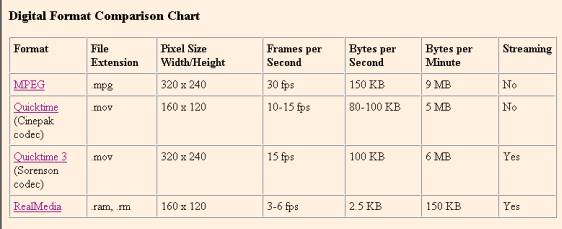
Different types of video files
(Chart is from American Memory Project, Library of Congress)
Chart summary - There are several different types of video files and they vary in image size, file size, smoothness of motion, and quickness of loading. --> If you need a video player to play these types of files, scroll down to the links below.
(The details - MPEG files can
run smoothly but are very large files and thus may require a wait for
downloading. Quicktime files (.mov) are
smaller in image size, smaller in file size and may load more quickly although
they are slightly “jerky” in their motion.
Quicktime 3 (.mov) and RealMedia files (.ram, .rm) allow streaming, meaning that the files can be played earlier, before they have finished downloading. Of the two, Quicktime 3 files have a larger
image size and are less “jerky” in movement than RealPlayer files. To play Quicktime and RealPlayer files, go to "Infamous Exploding Whale page" and then scroll down and select "video.")
Can your computer play these video file types? Click here to test.
Click to download players for these video file types:
- MPEG (www.mpeg.org/MPEG/MPEG-video-player.html)
- Quicktime (www.apple.com/quicktime)
- RealPlayer (www.real.com)
- Windows Media Player (comes with Windows)
- Shockwave (www.shockwave.com/bin/shockwave/entry.jsp)
back
.